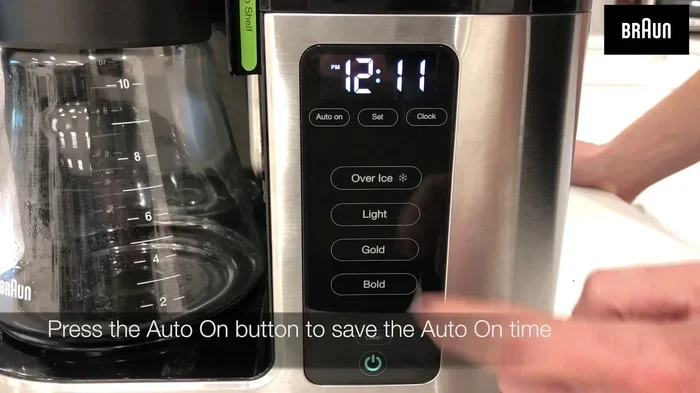
How To Set A Braun Coffee Maker Clock Step By Step
Setting the clock on your Braun coffee maker is simple once you know the right steps. This guide walks you through every button press and menu option with clear instructions. Whether you own a basic drip model or a programmable Braun coffee machine, you will master the Braun coffee maker clock in minutes. We also cover common issues and pro tips to keep your appliance running smoothly.
There is something deeply satisfying about waking up to the smell of fresh coffee already brewing. But that magic moment depends on one small detail many people overlook: the clock on your Braun coffee maker. If you just unboxed your machine or the power went out and your settings disappeared, you might be staring at a blank display wondering what to do next. The good news is that learning how to set a Braun coffee maker clock is incredibly easy. In this guide, we walk you through every single step so you can get back to enjoying your daily cup without any frustration.
A Braun coffee maker is one of the most popular choices in kitchens around the world. These machines are known for their reliability, simple design, and user-friendly controls. But even the best appliances can feel confusing when you first set them up. The Braun coffee maker clock might seem like a small feature, but it unlocks the full potential of your machine. From programmable brew times to keeping track of your morning schedule, the clock plays a bigger role than you might think. Whether you are a complete beginner or just need a quick refresher, this article has everything you need.
Key Takeaways
- Easy Setup: Setting the clock on most Braun coffee makers takes under two minutes with just a few button presses.
- No Manual Needed: Our step-by-step guide covers all popular Braun models so you do not need the original manual.
- Troubleshooting Included: Learn how to fix common clock problems like unresponsive buttons or a clock that resets after a power outage.
- Morning Routine Boost: A correctly set clock lets you use programmable features like auto-brew for a perfect morning coffee routine.
- Maintenance Matters: Regular cleaning and care keep your Braun coffee maker clock accurate and your machine lasting longer.
📑 Table of Contents
Understanding Your Braun Coffee Maker Clock
Before you start pressing buttons, it helps to understand what the clock does and where it lives on your machine. Every Braun coffee maker model is slightly different, but the basic clock function works the same way across most of them. The display panel usually sits on the top or front of the machine, right near the control buttons. Some models use a simple digital readout, while others have a more advanced screen with multiple settings.
What Does the Clock Do?
The clock is the brain behind many of your coffee maker’s programmable features. When the clock is set correctly, you can use the program coffee maker function to have fresh coffee ready at a specific time each morning. Without an accurate clock, the timer feature will not work properly. You might end up with coffee brewing at 3 AM instead of 6 AM, which is definitely not what anyone wants.
The clock also helps you keep track of how long your machine has been on. Some Braun models have an auto-shutoff feature that kicks in after a set number of hours. If the clock is wrong, the auto-shutoff timer might not work as intended. This is why taking a few minutes to set the coffee maker clock setting correctly is so important for both convenience and safety.
Which Braun Models Have a Clock?
Most modern Braun drip coffee makers include a digital clock display. Models like the Braun KF series and the Braun ThermoFresh line all feature this function. However, some older or more basic models might not have a digital display at all. If your machine has a simple mechanical dial instead of buttons, it likely does not have a clock feature. You can check your Braun coffee maker manual to confirm. If you no longer have the manual, you can usually find a digital copy on the Braun website by searching for your specific Braun coffee maker model.
Tools You Will Need Before Starting
One of the best things about setting the clock on a Braun coffee maker is that you do not need any special tools. You really only need two things: your Braun coffee maker and a little bit of patience. That is it. No screwdriver, no technical expertise, and no complicated equipment required.
Here is a quick checklist of what you should have ready before you begin:
- Your Braun coffee maker plugged in and powered on
- The control panel visible and accessible
- A few free minutes to follow along without rushing
- Your Braun coffee maker manual nearby if you want to double-check anything
Some people like to set the clock right after unboxing a new machine, which is similar to the process you would follow when setting up any new kitchen appliance. If you have ever set up a new oven, you know the feeling of pressing buttons and watching the display light up for the first time. Setting up your Braun coffee maker clock follows a very similar logic. If you want to learn more about setting up new kitchen appliances, check out our guide on how to use a brand new oven for general appliance setup tips that apply across the board.
Step-by-Step Guide to Setting the Clock
Now for the part you have been waiting for. The actual process of setting the clock is straightforward and usually takes less than two minutes. Follow these steps carefully and you will have your Braun coffee maker clock running in no time.
Step 1: Locate the Clock Button
Start by looking at the control panel on your Braun coffee maker. You are searching for a button labeled “Clock,” “TIME,” or sometimes just a clock icon. On most models, this button is clearly marked and easy to find. It is usually located near the top row of buttons, right next to the program or brew buttons.
If you are having trouble finding it, gently press each button one at a time and watch the display. The clock button will usually make the time digits flash or change. This visual feedback tells you that you have found the right button. Different Braun coffee maker buttons serve different functions, so pay attention to the symbols printed next to each one on the panel.
Step 2: Enter Clock Setting Mode
Once you find the clock button, press and hold it for about two to three seconds. On most Braun models, the time digits on the display will start flashing. This flashing means the machine has entered clock-setting mode and is ready for you to input the new time.
If the display does not flash after pressing the clock button, try pressing the clock button and then the “Hour” or “H” button right after. Some Braun models use a two-step process where you first select the setting mode and then adjust the values. Refer to your Braun coffee maker manual if this method does not work for your specific model.
Step 3: Set the Hours
With the clock in setting mode, you now need to adjust the hours. On most Braun coffee makers, you use the “Hour” button or the “+” and “-” buttons to change the hour value. Press the button repeatedly until the display shows the correct hour.
Keep in mind that many Braun coffee makers use a 24-hour format. This means that 2 PM shows as 14:00, and 8 PM shows as 20:00. If you are used to a 12-hour format, this might take a moment to get used to. Check the display carefully as you press the buttons. A small mistake here can throw off your entire morning schedule, so take your time with this step.
Step 4: Set the Minutes
After setting the hours, move on to the minutes. Look for a “Minute” button or the “M” symbol on your control panel. Press it to cycle through the minutes until you reach the correct value.
Most Braun coffee makers let you set the minutes in one-minute increments. Some higher-end models allow you to press and hold the button for faster adjustment. Set the minutes carefully and double-check the display before moving on. Getting both the hours and minutes right is essential for your programmable brew features to work correctly.
Step 5: Confirm and Save the Time
Once you have set both the hours and minutes, you need to confirm and save your settings. On most Braun models, you simply wait a few seconds without pressing any buttons. The display will stop flashing and the clock will be locked in. On some models, you may need to press the clock button one more time to confirm.
After saving, the display should show the correct time continuously. Try brewing a small test cup of coffee to make sure everything is working. If the coffee maker time display looks correct and the machine responds as expected, you have successfully set your Braun coffee maker clock.
Setting the clock this way is very similar to adjusting the time on other kitchen appliances. For instance, the process shares some similarities with how to change time on a Whirlpool oven. Both involve entering a setting mode, adjusting digits, and confirming the new time. Once you get the hang of it, you will find that setting clocks on kitchen appliances becomes second nature.
Troubleshooting Common Clock Issues
Even with the clearest instructions, you might run into a problem when setting your Braun coffee maker clock. Do not worry. Most clock issues are easy to fix and do not require any technical skills. Here are the most common problems and how to solve them.
Clock Not Responding to Buttons
If you press the clock button and nothing happens on the display, the first thing to check is the power connection. Make sure the coffee maker is plugged in firmly and that the outlet is working. Sometimes a loose power cord can cause the display to behave oddly. Try unplugging the machine, waiting 30 seconds, and plugging it back in. This simple reset often fixes unresponsive buttons and blank displays.
Another common cause is that the machine is in a locked or child-safe mode. Some Braun models have a lock feature that disables the buttons. Check your manual for instructions on how to unlock the control panel. Usually, you need to hold down a specific button combination for a few seconds to release the lock.
Clock Resets After a Power Outage
This is one of the most common clock issues with any coffee maker. When the power goes out, the clock resets to 00:00 or 12:00. You will need to set it again once the power comes back. This is completely normal and not a sign that anything is broken.
To avoid this problem in the future, consider plugging your Braun coffee maker into a surge protector with a battery backup. This keeps the clock running even during brief power outages. A coffee maker clock reset after a power surge is normal behavior, and re-setting it takes less than a minute once you know the steps.
Display Shows the Wrong Time After Setting
If you set the clock correctly but it still shows the wrong time, you might be using the 12-hour format when your machine expects 24-hour format, or vice versa. Go back through the steps and double-check your hour setting. Also, make sure you are not accidentally setting the time in a different mode. Some Braun coffee makers have multiple display modes, and the clock might not be the active one.
If the problem persists, try performing a full factory reset on your machine. Unplug the coffee maker for at least one minute, then plug it back in and start the clock-setting process from scratch. This clears any stored errors and gives you a fresh start.
Tips for Keeping Your Braun Coffee Maker in Top Shape
Setting the clock is just one part of owning a Braun coffee maker. Regular maintenance keeps your machine running accurately and ensures great-tasting coffee every single morning. A well-maintained coffee maker also keeps the clock and electronic components functioning properly.
Here are some simple maintenance tips that every Braun coffee maker owner should follow:
- Clean the carafe and filter basket after every use to prevent coffee oil buildup
- Descale your machine every one to two months using a vinegar and water solution or a descaling product
- Wipe down the exterior with a damp cloth to keep the control panel and display clean
- Replace the water filter regularly according to your model’s recommended schedule
- Run a plain water cycle once a month to flush out any mineral buildup inside the machine
Just like you would self-clean a gas oven to keep it performing at its best, regular cleaning of your coffee maker prevents buildup that can affect the clock and electronic sensors. A clean machine is a happy machine, and that includes the Braun coffee maker clock and all its programmable features.
Maximizing Your Morning Coffee Routine
Once your Braun coffee maker clock is set correctly, you can take full advantage of the programmable features. Many Braun models allow you to set a brew time up to 24 hours in advance. This means you can wake up to the smell of freshly brewed coffee without having to press a single button in the morning.
To use this feature, simply set the clock first, then press the program button and choose your desired brew time. Make sure you have ground coffee and water in the machine before the programmed brew time arrives. This feature is a game-changer for busy mornings and turns your morning coffee routine into a truly effortless experience.
Some users also like to set the clock to match their work schedule or family routine. For example, you might program the coffee maker to brew at 7 AM on weekdays and 8 AM on weekends. The clock makes all of this possible and adds a level of convenience that truly enhances your daily life.
Expert Insights on Coffee Maker Clocks
According to appliance experts, the clock function on coffee makers is often the most underappreciated feature. Many people never bother to set it correctly, which means they miss out on programmable brewing and auto-shutoff features. Taking the time to set your Braun coffee maker clock properly is one of the simplest ways to get more value out of your machine.
Experts also recommend checking the clock periodically, especially after any power interruption or after cleaning the machine. A quick glance at the display once a week can save you from unpleasant surprises like coffee brewing at the wrong time or the auto-shutoff not activating. These small habits add up and keep your coffee maker working reliably for years.
If you are new to programming kitchen appliances, the learning curve is very gentle. The coffee maker settings on Braun machines are designed to be intuitive and user-friendly. Within a few days of regular use, setting the clock and programming brew times will feel completely natural. You might even find yourself wondering how you ever managed mornings without these convenient features.
Key Takeaways
- Simple Process: Setting the clock on your Braun coffee maker involves just five easy steps: locate the clock button, enter setting mode, set hours, set minutes, and confirm.
- 24-Hour Format: Most Braun coffee makers use a 24-hour display format, so make sure you are entering the correct hour value.
- Power Outages Reset the Clock: Always re-set the clock after a power interruption to keep your programmable features working properly.
- Regular Maintenance Helps: Keeping your machine clean ensures the clock and electronic components stay accurate and responsive.
- Programmable Brewing: A correctly set clock unlocks the full potential of your Braun coffee maker’s programmable brew and auto-shutoff features.
- No Special Tools Needed: You only need your coffee maker and a couple of minutes to complete the entire process.
- Consult Your Manual: If you run into issues, your Braun coffee maker manual is the best resource for model-specific guidance.
Conclusion
Setting the Braun coffee maker clock is one of those small tasks that makes a big difference in your daily coffee experience. Once the clock is set correctly, you unlock programmable brewing, accurate auto-shutoff timers, and a more organized morning routine. The entire process takes less than two minutes and requires no special tools or technical knowledge.
We hope this step-by-step guide has made the process clear and easy to follow. From understanding your control panel to troubleshooting common issues, you now have everything you need to master your Braun coffee maker clock. The next time you power on your machine, take a moment to confirm the time is correct. It is a small habit that pays off every single morning.
Remember, a well-maintained coffee maker with an accurate clock is the foundation of a great morning. Take care of your Braun machine, set the clock regularly, and enjoy fresh coffee whenever you want it. Your future self will thank you every morning when that perfect cup of coffee is ready and waiting.
Frequently Asked Questions
How do I set the clock on my Braun coffee maker if the display is not flashing?
First, make sure your coffee maker is plugged in and powered on. Try pressing and holding the clock button for three to five seconds. If the display still does not flash, unplug the machine for one minute and plug it back in. This soft reset often restores the clock-setting function. If the problem continues, consult your Braun coffee maker manual for model-specific instructions.
Can I set a 12-hour format on my Braun coffee maker clock?
Most Braun coffee makers use a 24-hour format for the clock display. Some newer models may offer a 12-hour format option, but this varies by model. Check your Braun coffee maker manual or look for a format or 12/24 button on the control panel. If your model only supports 24-hour format, simply add 12 to any PM hour when entering the time.
Why does my Braun coffee maker clock reset every time I unplug it?
This is normal behavior for most Braun coffee makers. The clock memory relies on power, and unplugging the machine clears the stored time. To prevent this, plug your coffee maker into a surge protector with a battery backup. This keeps a small amount of power flowing to the clock even when the main power is off.
How often should I check and reset my Braun coffee maker clock?
You should check the clock whenever you notice the time is off or after a power outage. As a general habit, a quick weekly check is a good idea. This ensures your programmable brew features and auto-shutoff timers work correctly. A well-maintained clock also contributes to the overall accuracy of your coffee maker’s other functions.
What should I do if the clock buttons on my Braun coffee maker are stuck?
Stuck buttons are often caused by coffee spills or moisture buildup around the control panel. Unplug the machine and gently clean around the buttons with a slightly damp cloth. Let the area dry completely before plugging the machine back in. If the buttons are still stuck after cleaning, contact Braun customer support for further assistance or warranty service.
Can I use the programmable brew feature without setting the clock first?
No, the programmable brew feature relies on an accurate clock to know when to start brewing. Without the clock set correctly, the programmable timer will not activate at the right time. Always set the Braun coffee maker clock before programming a brew time. This ensures your coffee is ready exactly when you want it.