Delonghi Coffee Machine Lights Flashing What They Mean
DeLonghi coffee machine lights flashing can mean several things, from a simple water refill to a deeper error code that needs attention. Understanding what your DeLonghi espresso machine is trying to tell you saves time, money, and frustration. This guide breaks down every common blinking light pattern and gives you clear, step-by-step fixes. Whether you own a DeLonghi bean-to-cup model or a traditional espresso machine, you will find answers here. Let us help you decode those flashing lights and get your coffee maker brewing again.
You walk into the kitchen, ready for your morning DeLonghi coffee, and notice something strange. The lights on your machine are blinking. Maybe one light is flashing rapidly. Maybe several lights are dancing together in a pattern you have never seen before. It can feel confusing and a little worrying. But here is the good news. Those flashing indicator lights are actually trying to help you. They are your machine’s way of saying, “Hey, I need something.”
In this guide, we will walk you through exactly what each flashing light means on your DeLonghi coffee maker. We will cover common patterns, model-specific differences, and simple fixes you can do right at home. No matter if you own a compact DeLonghi filter machine or a fancy bean-to-cup espresso machine, this article has you covered. By the end, you will know exactly how to read your machine’s signals and get it back to making great coffee.
Key Takeaways
- Flashing lights on DeLonghi machines are designed to communicate specific issues, from water levels to descale reminders.
- Most flashing light problems are easy to fix at home with simple troubleshooting steps.
- Understanding your DeLonghi model is key because different machines use different light patterns.
- Regular maintenance like descaling and cleaning the water filter prevents many light-alert issues.
- Resetting your machine often clears error codes and stops unwanted blinking lights.
- Some flashing lights signal serious problems that need professional repair.
- Quick reference charts make it easy to match a light pattern to its meaning instantly.
📑 Table of Contents
- Understanding DeLonghi Coffee Machine Indicator Lights
- Common Flashing Light Patterns and Their Meanings
- How to Troubleshoot Flashing Lights on Your DeLonghi
- DeLonghi Model-Specific Light Indicators
- Preventive Maintenance Tips for Your DeLonghi Machine
- When to Call a Professional for Help
- Quick Tips for Common Flashing Light Issues
- Comparison of Common DeLonghi Flashing Light Issues
- Key Takeaways
- Frequently Asked Questions
- Conclusion
Understanding DeLonghi Coffee Machine Indicator Lights
DeLonghi coffee machines use a system of lights to communicate with you. These indicator lights sit on the front or top panel of the machine. They come in different colors and flash in different patterns. Each pattern has a specific meaning. Think of it like a simple language between you and your machine.
Most DeLonghi models use a combination of three main lights. You will typically see a power light, a brew light, and a steam light. Some models also have a water filter light, a descale light, and a bean indicator. When everything is working normally, these lights stay solid or turn off after completing a task. But when something needs your attention, they start blinking or flashing.
The color of the light also matters. A green or white light usually means everything is fine. An orange or yellow light often signals a reminder, like adding water or refilling beans. A red light usually means something needs immediate attention. Understanding these basics makes troubleshooting much easier.
What Each Light Color Typically Means
Let us break down the DeLonghi coffee machine lights flashing by color. This is the first step in decoding what your machine is telling you.
- Green or White Light: This is the happy light. It means your machine is ready to brew or is operating normally.
- Orange or Yellow Light: This is a reminder light. It might be telling you to descale the machine, replace the water filter, or refill the water tank.
- Red Light: This is a warning light. It usually signals an error or a problem that needs fixing before you can brew again.
- Blue Light: On some models, blue indicates the machine is warming up or the grinder is active.
Common Flashing Light Patterns and Their Meanings
Now let us get into the specific flashing light patterns you might see. Different patterns mean different things. We will go through the most common ones you are likely to encounter.
Single Light Flashing Rapidly
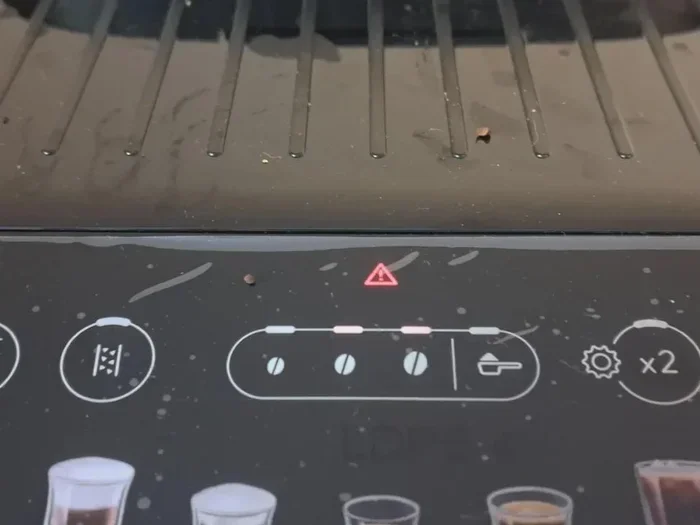
When one light flashes rapidly, it is often a coffee maker error code. On many DeLonghi models, a rapidly flashing red light means the machine has detected a fault. This could be a clogged brew head, an empty water tank, or a problem with the coffee grinder. The first thing to do is check the most obvious causes. Is the water tank filled? Is the bean hopper empty? Sometimes the fix is that simple.
If the obvious checks do not solve the problem, try turning the machine off and unplugging it for two minutes. Plug it back in and turn it on. This reset clears many temporary error codes. If the light keeps flashing, you may need to look deeper into the issue.
Multiple Lights Flashing Together
When several lights flash at the same time, it usually means a specific DeLonghi error code. For example, if the power light and the brew light both flash together, it could indicate a heating element problem. If the steam light and the water filter light flash together, it might mean the water filter needs replacing.
Each DeLonghi model has its own unique set of patterns. Checking your user manual is the best way to match a pattern to its meaning. If you do not have the manual, search online for your specific model number. DeLonghi’s website has detailed guides for every machine they make.
The Descale Light Flashing
The descale light is one of the most common reasons for flashing lights on a DeLonghi machine. This light tells you it is time to remove mineral buildup inside the machine. Hard water causes limescale to build up over time. This buildup can slow down your machine and affect the taste of your coffee.
When the descale light starts flashing, do not ignore it. Running a descaling cycle is simple. You will need a DeLonghi descaling solution or white vinegar mixed with water. Fill the water tank, place a large container under the coffee spout, and follow the descale program in your machine’s menu. The process usually takes about 20 to 30 minutes. Once it is done, the flashing light should stop.
The Water Filter Light Flashing
The water filter light flashes to remind you that the filter inside the water tank needs replacing. DeLonghi machines with built-in water filters use them to remove chlorine and impurities from your water. Over time, these filters become less effective.
Replacing the filter is easy. Open the water tank, remove the old filter, soak a new one in clean water for five minutes, and place it inside. Then press the water filter button to reset the indicator. The flashing should stop, and your machine will remind you again in about two months.
How to Troubleshoot Flashing Lights on Your DeLonghi
When your DeLonghi coffee machine lights flashing, you do not need to panic. Most issues are simple to fix. Here is a step-by-step troubleshooting guide you can follow.
Step 1: Check the Basics
Before you do anything else, check the simple things. Is the power cord plugged in securely? Is the water tank filled? Is the bean hopper loaded? Is the drip tray full and needs emptying? Sometimes a flashing light is just the machine telling you it needs water or beans. These basic checks solve the problem more often than you might think.
Step 2: Clean the Machine
Buildup is one of the top causes of flashing lights. Clean the brew group, the coffee spout, and the steam wand. Remove any coffee grounds or residue. A clean machine runs better and is less likely to show error lights. Wipe down the exterior and make sure no coffee grounds are stuck around the buttons or sensors.
Step 3: Run a Reset
Resetting your DeLonghi espresso machine can clear many error codes. Turn the machine off and unplug it from the wall. Wait at least two minutes. Plug it back in and turn it on. This simple step resets the internal computer and often stops blinking lights caused by temporary glitches.
Step 4: Check for Error Codes
Some DeLonghi models display actual error codes on a small screen along with flashing lights. If your machine has a display, write down the code. Search for that code on the DeLonghi website or in your manual. The code will tell you exactly what the problem is and how to fix it.
Step 5: Contact DeLonghi Support
If none of the steps above work, it is time to reach out. DeLonghi has a dedicated customer support team that can help you over the phone or through live chat. Have your model number ready. They can walk you through advanced troubleshooting or arrange a repair if needed.
DeLonghi Model-Specific Light Indicators
Not all DeLonghi machines work the same way. The coffee machine lights on a DeLonghi Magnifica work differently than those on a DeLonghi Dinamica or a DeLonghi ECP36.30. Knowing your specific model makes a huge difference when troubleshooting.
DeLonghi Bean-to-Cup Machines
Bean-to-cup models like the Magnifica and Dinamica have more lights and buttons. These machines grind the beans fresh for each cup. The coffee grinder light might flash if the grinder is jammed or the bean hopper is empty. The steam light might flash if the steam wand needs cleaning. These machines also have more complex error code systems, so always refer to the specific model manual.
DeLonghi Filter and Espresso Machines
Traditional filter machines and manual espresso machines have fewer lights. A flashing light on these models usually means a water issue or a temperature problem. For example, the DeLonghi ECP36.30 might flash its power light if the water tank is not seated properly. The ECP33.20 might flash its brew light if the filter button needs pressing to start a new brew cycle.
DeLonghi Super-Automatic Machines
Super-automatic machines are the most advanced. They handle grinding, tamping, brewing, and steaming all on their own. Because they have so many moving parts, they also have more lights that can flash. A flashing light on a super-automatic might indicate a bean hopper issue, a steam function problem, or a need for routine maintenance like cleaning the drip tray or replacing the coffee grounds container.
Preventive Maintenance Tips for Your DeLonghi Machine
The best way to avoid DeLonghi coffee machine lights flashing is to keep up with regular maintenance. A well-maintained machine runs smoothly and rarely shows error lights. Here are some easy tips to keep your machine in great shape.
Descale Regularly
Descale your machine every one to three months depending on how often you use it and how hard your water is. Regular descale cycles prevent limescale buildup that can cause heating problems and flashing lights.
Replace the Water Filter
Change your water filter every two months or as recommended by DeLonghi. A clean filter keeps your coffee tasting fresh and helps the machine operate properly.
Clean the Brew Group
The brew group is the heart of your machine. Remove it regularly and rinse it under warm water. This prevents coffee oil buildup that can cause blockages and error lights.
Use Fresh Beans and Clean Water
Always use fresh coffee beans and clean, filtered water. Old or stale beans can clog the grinder. Dirty water causes more mineral buildup inside the machine.
Empty the Drip Tray and Grounds Container
Do not let these containers overfill. A full drip tray or grounds container can trigger flashing lights on many DeLonghi models. Empty them regularly for trouble-free operation.
When to Call a Professional for Help
Most flashing light issues are easy to fix at home. But some problems need a professional touch. If your DeLonghi coffee maker shows a red flashing light that does not stop after a reset, it could signal a serious internal fault. If the machine leaks water, makes unusual grinding noises, or refuses to heat up, those are signs of a deeper problem.
Do not try to open the machine and fix internal parts yourself. This can void your warranty and cause further damage. Instead, contact DeLonghi customer service or a certified repair technician. They have the tools and expertise to diagnose and fix complex issues safely.
Keep your warranty information handy. Many DeLonghi machines come with a one- or two-year warranty that covers repair costs for manufacturing defects. If your machine is still under warranty, professional repairs might be free or discounted.
Quick Tips for Common Flashing Light Issues
- Light flashing after cleaning: Press and hold the on/off button for five seconds to reset the machine.
- Light flashing during brewing: Check that the coffee spout is properly aligned and the cup is in the right position.
- Light flashing and machine will not start: Make sure the water tank is fully seated and the bean hopper is closed tightly.
- Light flashing after descaling: Run a rinse cycle with clean water to clear any remaining descaling solution from the system.
- Light flashing intermittently: This is often a sign of a loose connection. Check the water tank, drip tray, and brew group to make sure everything is clicked into place.
Comparison of Common DeLonghi Flashing Light Issues
| Light Pattern | Likely Meaning | How to Fix |
|---|---|---|
| Single red light flashing | Error code or fault detected | Reset machine, check water and beans, consult manual |
| Descale light flashing | Mineral buildup needs removal | Run descaling cycle with DeLonghi solution |
| Water filter light flashing | Water filter needs replacement | Replace filter and reset indicator button |
| Multiple lights flashing | Specific error code or maintenance needed | Check model-specific error codes in manual |
| Brew light flashing | Brew group issue or cup position | Clean brew group, align spout, check cup placement |
| Steam light flashing | Steam wand needs cleaning or descaling | Clean steam wand, run descale cycle |
Keeping this table handy near your machine can save you time the next time a light starts flashing. You will know exactly what to do without searching for the manual.
Key Takeaways
- Flashing lights on DeLonghi machines are designed to communicate specific issues, from water levels to descale reminders.
- Most flashing light problems are easy to fix at home with simple troubleshooting steps.
- Understanding your DeLonghi model is key because different machines use different light patterns.
- Regular maintenance like descaling and cleaning the water filter prevents many light-alert issues.
- Resetting your machine often clears error codes and stops unwanted blinking lights.
- Some flashing lights signal serious problems that need professional repair.
- Quick reference charts make it easy to match a light pattern to its meaning instantly.
Frequently Asked Questions
Why is my DeLonghi coffee machine flashing and not brewing?
A flashing light combined with a machine that will not brew usually means there is a blocked or misaligned part. Check that the water tank is full and properly seated. Make sure the brew group is clean and inserted correctly. Also verify that the drip tray is not full. If these checks do not work, try resetting the machine by unplugging it for two minutes and plugging it back in.
How do I reset the flashing lights on my DeLonghi machine?
To reset the lights, turn the machine off and unplug it from the power outlet. Wait at least two minutes, then plug it back in and turn it on. This clears most temporary error codes and stops flashing lights caused by minor glitches. If the lights keep coming back, the underlying issue still needs to be addressed.
What does it mean when the red light on my DeLonghi flashes three times?
A red light flashing in a specific pattern, like three times in a row, is a DeLonghi error code. The number of flashes tells you which part of the machine has a problem. Check your user manual or search for your model number online to find the exact meaning of the flash pattern. Common causes include a clogged brew head, a faulty heating element, or a sensor issue.
How often should I descale my DeLonghi coffee machine?
You should descale your DeLonghi machine every one to three months. The exact frequency depends on how often you use the machine and the hardness of your water. If you notice the descale light flashing, it is time to run a descaling cycle. Regular descaling keeps your machine running smoothly and prevents the buildup that causes flashing warning lights.
Can I use vinegar instead of DeLonghi descaling solution?
Yes, white vinegar works as an alternative to the official DeLonghi descaling solution. Mix equal parts vinegar and water, then run it through a brewing cycle. Follow up with two to three rinse cycles using clean water to remove any vinegar taste. The descale light should stop flashing after the process is complete and the machine has been rinsed thoroughly.
Why does the steam light keep flashing even after I clean the wand?
If the steam light keeps flashing after cleaning, there may be mineral buildup inside the steam tube that you cannot see from the outside. Run a descaling cycle to clear internal buildup. You can also purge the steam wand by turning the steam knob and letting hot water run through for a few seconds. If the light still flashes, the steam function may need a deeper clean or a part replacement.
Conclusion
Dealing with DeLonghi coffee machine lights flashing does not have to be stressful. As we have covered, those blinking lights are your machine’s built-in communication system. They tell you exactly what it needs, whether that is water, a filter change, or a simple reset. Most issues are quick and easy to fix with the steps outlined in this guide.
Remember to keep up with regular maintenance like descaling, cleaning, and replacing filters. These habits go a long way in preventing flashing light problems before they even start. When you do encounter a light you do not recognize, refer back to this guide or your machine’s manual for help.
The next time your DeLonghi espresso machine starts blinking at you, you will know exactly what to do. You will be able to diagnose the issue, apply the right fix, and get back to enjoying your perfect cup of coffee. Keep this guide bookmarked for easy reference, and share it with anyone else who owns a DeLonghi coffee maker. A little knowledge goes a long way in keeping your machine running at its best every single day.