Complete Guide To Symbols On Ovens What Do They Mean
Understanding symbols on ovens what do they mean is the key to cooking with confidence. This guide explains every common oven icon, from bake and broil to convection and defrost symbols. You will learn what each oven function does, how to read your oven display symbols, and avoid common mistakes that waste energy and food.
Have you ever stood in front of your oven, staring at a wall of tiny icons and wondering what on earth they all mean? You are not alone. Symbols on ovens what do they mean is one of the most searched questions by home cooks everywhere. Whether you just moved into a new kitchen or bought a new oven, the symbols on ovens what do they mean can feel like a secret code. This guide breaks down every common oven icon so you can cook with total confidence.
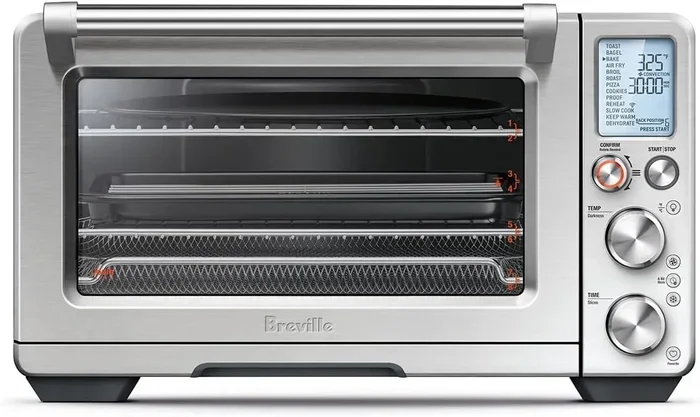
Your oven’s control panel is packed with oven symbols guide information. Each tiny icon serves a specific purpose. From baking bread to broiling steak, these cooking symbols tell you exactly how your oven will behave. Once you learn the basics, you will never second-guess your settings again. This article covers every major oven function and icon in plain, simple language.
We walk you through the oven icons explained step by step. You will find practical tips, real examples, and common mistakes to avoid. By the end, reading your oven display symbols will feel as easy as pie. Let us dive in and decode your oven together.
Key Takeaways
- Know Your Oven: Every oven uses a set of oven symbols guide icons that control heat, fan, and cooking mode.
- Bake vs. Roast: The bake symbol uses bottom heat, while the roast setting combines top and bottom elements for even cooking.
- Convection Changes Everything: The convection symbol activates a fan that circulates hot air for faster, more even results.
- Broil and Grill Are Different: The broil symbol uses top heat for browning, while the grill symbol often refers to a separate grilling element.
- Defrost Is Not a Cooking Mode: The defrost symbol uses room-temperature or low warm air to thaw food safely.
- Read the Manual: Your specific oven model may have unique oven heat icons not found in this guide.
- Practice Makes Perfect: Once you learn the oven control panel symbols, cooking becomes faster and more enjoyable.
📑 Table of Contents
Understanding Your Oven’s Control Panel
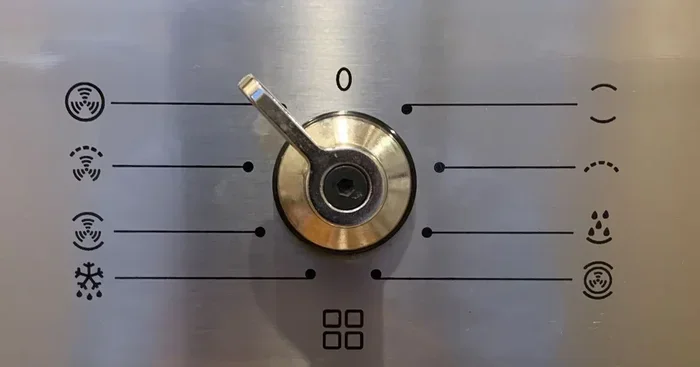
The first step to mastering your oven is understanding the oven control panel. Every oven has a front-facing panel filled with buttons, dials, and a digital display. The symbols on ovens what do they mean are printed right on or near these controls. They may look small and confusing at first, but each one has a clear job.
Most modern ovens use a digital display with touch buttons. Older models often use rotary dials with printed icons. Both types rely on the same set of kitchen appliance symbols. Once you learn what each icon represents, you can navigate your oven like a pro.
The Basics of Oven Controls
Every oven control panel has a few core components. The temperature dial or buttons let you set the heat level. The mode selector lets you choose the oven mode symbols for different cooking tasks. A timer function helps you track cooking time. Some ovens also have a clock display and a child lock feature.
The oven heat icons on your panel tell you which heating element is active. The bottom element is used for baking. The top element is used for broiling. The fan element circulates hot air for convection cooking. Each of these elements has its own icon on the panel.
Why Symbols Matter for Everyday Cooking
Using the wrong oven settings explained can lead to undercooked or burnt food. For example, using the broil setting for a cake will give you a mess. Using the bake setting for a steak will not give you the crust you want. The oven symbols guide exists to prevent these mistakes.
When you know what each icon means, you can choose the right oven function for every dish. This saves time, energy, and ingredients. It also helps you get consistent results every time you cook. Learning the symbols on ovens what do they mean is one of the best investments you can make in your kitchen skills.
Common Oven Symbols and What They Mean
The most important part of any symbols on ovens what do they mean guide is the core cooking symbols. These icons appear on nearly every oven model. They control the basic way your oven heats food. Let us break down each one so you can use them with confidence.
Bake and Roast Symbols
The bake symbol is one of the most recognizable oven icons explained in any oven symbols guide. It usually looks like a single line at the bottom of a square or circle. This icon tells your oven to use only the bottom heating element. The top stays cooler, which is perfect for cakes, cookies, and casseroles.
The roast symbol often looks like two lines, one at the top and one at the bottom of a square. This means both heating elements are active. Roast mode creates even heat from all sides. It works great for whole chickens, roasts, and vegetables that need browning on all surfaces.
Here is a quick comparison of the two:
- Bake Mode: Bottom heat only. Best for baked goods and dishes that need a steady, gentle heat from below.
- Roast Mode: Top and bottom heat. Best for meats and large dishes that need even cooking on all sides.
A common mistake is using bake mode for everything. But roasts need the extra top heat to brown the surface. Always match the oven settings explained to the type of food you are cooking.
Broil and Grill Symbols
The broil symbol usually looks like a zigzag line at the top of a square. This setting activates only the top heating element. It produces very high, direct heat from above. Broiling is perfect for melting cheese, browning the top of casseroles, or getting a crispy finish on steaks.
The grill symbol can look similar but sometimes includes a wavy line or a grid pattern. On some ovens, grill and broil mean the same thing. On others, the grill setting refers to a separate grilling element inside the oven cavity. Always check your oven symbols guide for your specific model.
When using the broil symbol, keep a close eye on your food. Broil heat is intense and can burn food quickly. Place your dish on the top oven rack for the best results. Use the oven heat icons as a reminder that only the top element is working.
Convection and Fan Symbols
The convection symbol is a fan icon, usually shown as a circle with curved arrows or a small fan blade inside a square. This setting turns on the oven fan to circulate hot air around the food. The fan oven symbol is one of the most useful oven mode symbols for even cooking.
Convection cooking has several benefits. It reduces cooking time by up to 25 percent. It promotes even browning on all sides of food. It also allows you to cook multiple dishes at once without hot spots. If you love baking pastries or roasting vegetables, the convection setting is your best friend.
However, there are a few things to keep in mind. When using the convection symbol, you may need to lower the temperature by about 20 degrees Fahrenheit. The moving air transfers heat more efficiently, so food cooks faster and hotter. Always check if your oven display symbols show a combined convection and bake mode for the best results.
Defrost and Thaw Symbols
The defrost symbol often looks like a snowflake or a drop of water with lines. This cooking symbol does not apply heat at all. Instead, it uses room-temperature air or a very low warm setting to thaw frozen food safely.
Using the defrost function is much safer than leaving food out on the counter. It prevents the outer layers of food from entering the danger zone for bacterial growth. The oven symbols guide recommends using defrost mode for meat, fish, and frozen vegetables before cooking them.
Keep in mind that defrosting takes time. A pound of ground meat may take 30 to 60 minutes to thaw fully. Always plan ahead and use the oven heat icons to confirm the defrost mode is active. Never skip this step if your recipe calls for thawed ingredients.
Temperature Symbols and Display Icons
Beyond the cooking modes, your oven also uses oven temperature symbols to show the current heat level. These icons appear on the digital display or near the temperature dial. Understanding them helps you monitor and adjust your cooking with precision.
Reading the Temperature Display
The temperature display shows the current or set oven temperature. It may use the symbol C for Celsius or F for Fahrenheit. Some ovens show a digital number, while others use a bar graph that fills up as the oven heats. The oven display symbols will also show when the oven has reached your target temperature.
Most symbols on ovens what do they mean guides recommend preheating the oven before baking. The preheat icon often looks like a small oven with rising lines or arrows. When this icon disappears from the display, your oven is ready. Placing food in a cold oven can lead to uneven cooking and longer bake times.
Heat Source Indicators
Some advanced ovens show which heating element is currently active. A small icon at the bottom of the display may light up to show the bottom element is on. Another icon may appear at the top for the broil element. These oven heat icons are very helpful for troubleshooting uneven cooking.
If your food is browning too much on top, check if the top element is staying on too long. If the bottom is not cooking, the bottom element may not be activating. These oven control panel indicators help you catch problems early and adjust your cooking approach.
Specialized Oven Functions Explained
Modern ovens come with many extra features beyond basic baking and broiling. These oven functions use unique oven mode symbols that can confuse even experienced cooks. Let us look at some of the most common specialized functions.
Self-Clean and Steam Functions
The self-clean symbol usually looks like a circle with a key or a padlock inside. This function heats the oven to extremely high temperatures, around 900 degrees Fahrenheit, to burn off food residue. You should always remove large food pieces before starting the self-clean cycle.
Steam ovens are becoming more popular in modern kitchens. The steam symbol looks like a cloud or a series of dots rising upward. Steam cooking keeps food moist and helps vegetables retain their color and nutrients. Some ovens combine steam with convection for even better results.
Timer and Alarm Symbols
The timer symbol often looks like a clock face or a bell icon. This function lets you set a countdown without changing the oven temperature. When the timer goes off, the oven may beep or flash an alarm icon. The oven symbols guide in your manual will show exactly which icon represents the timer on your model.
Some ovens also have a keep-warm function. This symbol looks like a small oven with a rising steam line. It maintains a low temperature of around 150 to 170 degrees Fahrenheit to keep cooked food warm until you are ready to serve.
Quick Tips for Decoding Oven Symbols
Learning the symbols on ovens what do they mean does not have to be overwhelming. Here are some quick tips to make the process easier and faster.
- Start with the basics: Focus on bake, roast, broil, and convection first. These four modes cover most home cooking tasks.
- Use your manual: Every oven comes with a manual that includes a complete oven icons explained section. Keep it handy.
- Look for the legend: Many ovens have a small printed legend on the inside of the door or on the control panel. This is your quick reference for all oven heat icons.
- Take a photo: Snap a picture of your oven’s control panel. You can refer to it anytime while cooking without flipping through a manual.
- Practice one symbol at a time: Try one new oven function each week. Master it before moving on to the next one.
- Search online: If you cannot find a symbol in your manual, search for your oven brand and model number online for a detailed oven symbols guide.
Common Mistakes People Make With Oven Symbols
Even experienced cooks sometimes make mistakes with their oven display symbols. Here are the most common errors and how to avoid them.
- Confusing bake and convection: Using convection mode for delicate cakes can cause them to rise too fast and collapse. Always use bake mode for cakes and souffles.
- Forgetting to preheat: Many people skip the preheat step and place food in a cold oven. This leads to uneven cooking and longer preparation times.
- Using broil for everything: The broil symbol is for finishing and browning, not for full cooking. Leaving food under the broiler too long will burn it.
- Ignoring the defrost setting: Cooking frozen food without thawing first leads to uneven results. The defrost symbol exists for a reason, so use it.
- Not cleaning the symbols: Grease and grime can obscure the icons on your control panel. Wipe them regularly so you can read every oven function clearly.
Avoiding these mistakes will help you get better results from every meal. Take a few minutes to study your oven’s symbols on ovens what do they mean before your next cooking session. The effort pays off in better food and less wasted energy.
Conclusion
Understanding the symbols on ovens what do they mean is one of the simplest ways to improve your cooking. From the bake symbol to the convection symbol, each icon has a clear purpose. Once you know what each oven mode symbol does, you can cook with confidence and creativity.
Use this guide as your go-to oven symbols guide whenever you are unsure about a setting. Keep it bookmarked on your phone or printed and taped inside a kitchen cabinet. The more you practice, the more natural reading your oven display symbols will become.
Your oven is a powerful tool, and the symbols on ovens what do they mean are the key to unlocking its full potential. Start exploring your oven’s functions today and enjoy better, more consistent results in every meal you prepare.
Frequently Asked Questions
What do the basic oven symbols mean?
The basic oven symbols include the bake icon (a single bottom line), the roast icon (top and bottom lines), the broil icon (a zigzag top line), and the convection icon (a fan with arrows). Each oven function controls a different heating element or air circulation method. Check your oven symbols guide for the exact shape on your model.
How do I know which oven symbol to use for baking?
For most baking tasks, use the bake symbol which activates only the bottom heating element. This provides steady, gentle heat from below. For bread and pizza, you may want to use the convection symbol for even browning. Always refer to your cooking symbols chart for the best match to your recipe.
What is the difference between broil and grill symbols?
The broil symbol and grill symbol can mean the same thing on some ovens, but on others they refer to different elements. Broil uses the top heating element for high, direct heat. Grill may refer to a separate element or a combination mode. Your oven icons explained manual will clarify the difference for your specific model.
Can I use the convection setting for all types of cooking?
Convection is great for roasting, baking pastries, and cooking multiple dishes at once. However, you should avoid using the convection symbol for delicate items like souffles, custards, or cakes. The circulating air can cause uneven rising. Stick to bake mode for these sensitive dishes.
Why is my oven showing a symbol I do not recognize?
Many modern ovens have advanced features with unique oven mode symbols that are not in standard guides. Check your oven’s manual for a complete list of oven display symbols. You can also search online using your oven brand and model number for a detailed oven symbols guide.
How often should I clean my oven control panel?
You should wipe down your oven control panel at least once a week. Grease and food splatter can obscure the oven heat icons and make them hard to read. Use a mild cleaner and a soft cloth. Keeping your symbols on ovens what do they mean clean ensures you can always read them clearly and cook safely.