How To Empty Water From Bunn Coffee Maker Step By Step
Emptying water from your Bunn coffee maker is simple when you follow the right steps. This guide walks you through draining the reservoir, cleaning the tank, and maintaining your machine for the best-tasting coffee. Whether you are storing your Bunn or just need to refresh the water, you will find clear instructions and helpful tips here.
Your Bunn coffee maker is one of the hardest-working appliances in your kitchen. It brews hot coffee fast, keeps water warm, and delivers that perfect morning cup you count on every day. But like all kitchen equipment, it needs regular care. One of the most important yet overlooked tasks is learning how to empty water from Bunn coffee maker properly. Whether you are storing the machine for the season, doing a deep clean, or just refreshing the reservoir, this process matters more than most people realize.
Stale water sitting inside a Bunn brewer can lead to mineral buildup, bacteria growth, and off-flavors in your next pot of coffee. Nobody wants that. The good news is that emptying and draining your Bunn coffee maker is not complicated. With the right approach, you can do it in under 15 minutes. In this guide, we will walk you through every single step. You will learn how to drain the water tank, clean internal components, and maintain your machine so it keeps brewing great coffee for years.
If you also enjoy exploring other coffee methods, check out how to make coffee without filter or machine for some creative alternatives. Now, let us dive into the full step-by-step process of emptying water from your Bunn coffee maker.
Key Takeaways
- Draining your Bunn coffee maker is easy: You only need a few basic tools and about 15 minutes.
- Regular water emptying prevents buildup: Stale water can cause mineral deposits and affect coffee taste.
- Descaling is a related but different task: Emptying water removes liquid, while descaling removes mineral scale inside the machine.
- Always unplug before draining: Safety comes first when working with any kitchen appliance.
- Clean accessories matter too: The carafe, funnel, and spray head need attention during the process.
- Store properly after emptying: If you are not using the machine for a while, proper storage prevents mold and odors.
📑 Table of Contents
- Why Emptying Water From Your Bunn Coffee Maker Matters
- What You Need Before You Start
- Step-by-Step Guide to Empty Water From Bunn Coffee Maker
- Common Mistakes People Make When Draining a Bunn Coffee Maker
- How Often Should You Empty and Clean Your Bunn Coffee Maker?
- Tips for Maintaining Your Bunn Coffee Maker Between Cleanings
- What to Do If Your Bunn Coffee Maker Will Not Drain Properly
- Storing Your Bunn Coffee Maker After Emptying
- Final Thoughts
Why Emptying Water From Your Bunn Coffee Maker Matters
Many coffee lovers focus on the beans, the grind, and the brew cycle. But the water inside your machine plays an equally important role. Here is why regularly emptying the water reservoir should be part of your routine.
Prevents Mineral Buildup
Tap water contains minerals like calcium and magnesium. Over time, these minerals build up inside your Bunn coffee maker. This scale can clog the spray head, reduce water flow, and even damage the heating element. When you empty and flush the system regularly, you reduce the chance of hard water deposits forming inside the tank and tubes.
Eliminates Stale Water Odors
Water that sits in the reservoir for days starts to develop a stale, flat smell. This odor can transfer to your coffee and affect the flavor. Emptying the water before each brew cycle ensures fresh, clean water flows through your machine every time.
Reduces Bacteria Growth
Warm, standing water is a breeding ground for bacteria and mold. Your Bunn coffee maker keeps water warm in the tank, which can accelerate microbial growth if the water sits too long. Draining the reservoir regularly helps keep your machine hygienic and safe to use.
Extends the Life of Your Machine
Proper maintenance always pays off. A well-cared-for Bunn brewer can last 10 years or more. Emptying the water, cleaning the components, and performing routine upkeep all contribute to a longer machine lifespan. Think of it as a small investment of time for a big return.
What You Need Before You Start
Before you begin the draining process, gather a few simple items. You do not need any special tools or equipment. Here is what will make the job smooth and easy.
- Clean towels or cloths: To catch any spills and wipe down surfaces.
- A large bowl or pitcher: To collect water as it drains out.
- White vinegar or descaling solution: For cleaning the tank after draining.
- Soft sponge or cloth: For wiping the exterior and removable parts.
- Warm water: For rinsing components after cleaning.
Once you have these items ready, you are set to move on to the step-by-step process. The entire draining procedure works for most Bunn models, including the Bunn Velocity Brew and the classic Bunn drip coffee machine.
Step-by-Step Guide to Empty Water From Bunn Coffee Maker
Now for the main part. Follow these steps carefully to safely and completely drain water from your Bunn coffee maker. Each step is designed to be simple and straightforward.
Step 1: Unplug the Machine
Safety always comes first. Before you touch any internal parts, unplug your Bunn coffee maker from the wall outlet. The machine has a hot water reservoir, and you do not want to risk burns or electrical issues while working. Give the machine a few minutes to cool down if it has been brewing recently.
Step 2: Remove the Carafe and Funnel
Take out the glass carafe or thermal carafe from the warming plate. Set it aside. Next, remove the funnel or spray head from the top of the machine. The funnel is the part that distributes water over the coffee grounds. On most Bunn models, it simply lifts off. Set these parts aside for cleaning later.
Step 3: Open the Reservoir Lid
Lift the lid on top of the coffee maker to expose the water reservoir. This is the tank that holds the water before it gets heated and brewed. You will see the water level inside. This is where the main draining happens.
Step 4: Tilt the Machine to Drain
Place a large bowl or pitcher near the back of the machine. Carefully tilt the Bunn coffee maker backward at a slight angle. The water will flow out of the reservoir opening toward the back. Guide it into your bowl or pitcher. Go slowly to avoid spills.
Some Bunn models have a drain plug at the bottom of the reservoir. If yours has one, simply remove the plug and let the water drain directly into your container. Check your Bunn coffee maker manual if you are unsure whether your model has a drain valve.
Step 5: Drain Remaining Water from the Hot Water Tank
Here is an important detail many people miss. The Bunn coffee maker has a separate hot water tank that holds heated water even after the reservoir is empty. To drain this, tilt the machine further or place it on a gentle incline. Let any remaining hot water flow out completely. Use caution because this water may still be warm.
Step 6: Clean the Reservoir and Internal Components
Once all the water is out, it is time to clean. Mix a solution of equal parts white vinegar and warm water. Pour this into the empty reservoir. Let it sit for 15 to 20 minutes. This helps dissolve any mineral deposits or residue inside the tank. After soaking, tilt the machine again to drain the vinegar solution out completely.
Follow up by rinsing the reservoir with plain warm water two or three times. This removes any vinegar taste or smell. Wipe the inside of the reservoir with a soft cloth to remove any remaining buildup.
Step 7: Clean Removable Parts
While the reservoir is drying, clean the carafe, funnel, and spray head. Wash them with warm soapy water and a soft sponge. Rinse thoroughly and dry with a clean towel. For stubborn stains or coffee residue, a paste of baking soda and water works wonders. Just apply it gently and scrub with a soft cloth.
If you are deep cleaning your kitchen appliances, you might also want to check out how to clean bottom tray of toaster oven for tips on maintaining other equipment in your kitchen.
Step 8: Dry Everything Completely
Before reassembling your Bunn coffee maker, make sure all parts are completely dry. Use a clean, dry cloth to wipe down the reservoir, the funnel, and the carafe. Moisture left inside can lead to mold or mildew, which defeats the purpose of your cleaning effort. Let the machine air dry for a few extra minutes if needed.
Step 9: Reassemble and Test
Place the funnel or spray head back onto the machine. Put the carafe on the warming plate. Plug the machine back in. Fill the reservoir with fresh, cold water and run a full brew cycle without coffee grounds. This flushes out any remaining vinegar or cleaning solution. Discard the first brew water and your Bunn is ready to use again.
Common Mistakes People Make When Draining a Bunn Coffee Maker
Even simple tasks can go wrong if you are not careful. Here are some common mistakes to avoid when emptying water from your Bunn coffee maker.
- Skipping the unplugging step: This is the most dangerous mistake. Always disconnect the machine from power before draining.
- Forgetting the hot water tank: Many people drain the reservoir but leave the hot water tank full. This defeats the purpose and leaves stale water inside.
- Using harsh chemicals: Avoid bleach or abrasive cleaners. They can damage the internal components and leave harmful residues. Stick to white vinegar or a commercial descaling solution.
- Not rinsing after cleaning: If you use vinegar, always rinse thoroughly. A lingering vinegar taste will ruin your next pot of coffee.
- Reassembling while wet: Moisture trapped inside can cause mold growth. Always dry parts completely before putting them back together.
How Often Should You Empty and Clean Your Bunn Coffee Maker?
The frequency of draining and cleaning depends on how often you use your machine and the quality of your water supply. Here is a general guideline.
| Usage Level | Drain and Rinse | Deep Clean with Vinegar |
|---|---|---|
| Daily use (1-3 pots per day) | Every 1-2 weeks | Every 1-2 months |
| Moderate use (3-5 times per week) | Every 2 weeks | Every 2 months |
| Occasional use (1-2 times per week) | After each use | Every 3 months |
| Seasonal or storage use | Before storing | Before storing |
If you live in an area with hard water, you should increase the frequency of both draining and descaling. Hard water accelerates mineral buildup and can affect the performance of your Bunn brewer faster than in soft water areas.
Tips for Maintaining Your Bunn Coffee Maker Between Cleanings
Draining and deep cleaning are important, but daily habits also keep your machine in great shape. Here are some easy maintenance tips.
- Empty leftover water after each use: Do not let water sit in the reservoir overnight. Pour out any remaining water after brewing.
- Use filtered water: Filtered water has fewer minerals, which reduces scale buildup inside your machine.
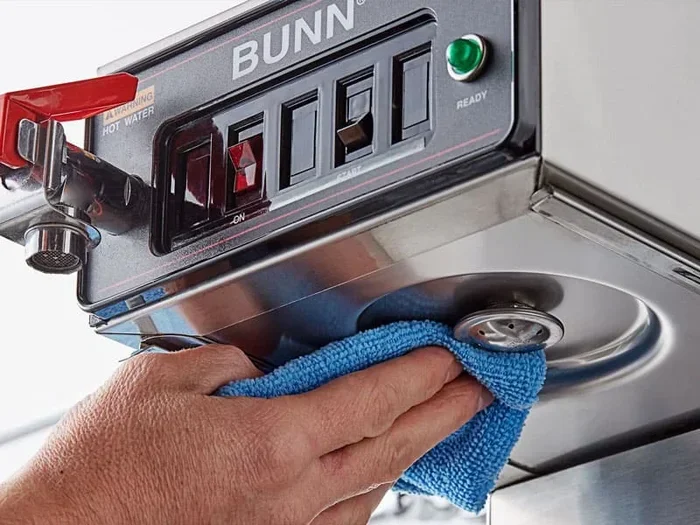
- Wipe the exterior regularly: A quick wipe with a damp cloth keeps your Bunn looking clean and prevents dust buildup.
- Clean the carafe after every brew: Coffee oils can build up in the carafe and affect the taste of future brews.
- Check the spray head for clogs: Remove the spray head periodically and rinse it under running water to clear any coffee grounds or mineral deposits.
If you enjoy drying herbs or other kitchen items, you might be interested in how to dry basil in oven for preserving fresh herbs from your kitchen. Keeping your kitchen organized and clean makes the whole coffee-making experience better.
What to Do If Your Bunn Coffee Maker Will Not Drain Properly
Sometimes, even with regular maintenance, a Bunn coffee maker may resist draining. Here is what to do if you run into trouble.
First, check for visible blockages. The spray head and the funnel tube are common spots where coffee grounds and mineral deposits accumulate. Remove these parts and clean them thoroughly. If the water still does not flow, try placing the machine on a slightly steeper incline to encourage drainage.
If mineral scale is blocking the internal tubes, a vinegar soak can help. Fill the reservoir with a mixture of one part vinegar to two parts warm water. Let it sit for 30 minutes. Then, tilt the machine to drain the solution. Repeat if necessary. For persistent clogs, a commercial coffee maker descaling solution works well. Follow the product instructions carefully.
If none of these steps solve the problem, consult your Bunn coffee maker manual or contact Bunn customer service. Some issues may require professional repair, especially if the heating element or internal pump is affected.
Storing Your Bunn Coffee Maker After Emptying
If you plan to store your Bunn coffee maker for an extended period, proper preparation is essential. After emptying and cleaning all components, make sure everything is completely dry. Leave the reservoir open and the machine unplugged. Store it in a cool, dry place away from direct sunlight.
Before using the machine again after storage, run two or three full brew cycles with fresh water and no coffee grounds. This flushes out any dust or stale air that may have accumulated during storage. Your Bunn will be ready to brew great coffee as if it were brand new.
For those who are also setting up a new kitchen or appliance, learning how to use a brand new oven can be helpful alongside maintaining your coffee equipment. A well-organized kitchen makes every task easier.
Final Thoughts
Learning how to empty water from Bunn coffee maker is a simple but essential skill for any coffee lover. It takes just a few minutes, requires no special tools, and keeps your machine running at its best. Regular draining, cleaning, and maintenance prevent mineral buildup, eliminate stale odors, and extend the life of your Bunn brewer.
Make this part of your routine. Whether you are doing a quick drain after each use or a deep clean every couple of months, your Bunn coffee maker will reward you with better-tasting coffee and reliable performance. Follow the steps in this guide, avoid the common mistakes, and enjoy a cleaner, fresher brewing experience every single morning.
Frequently Asked Questions
Can I leave water in my Bunn coffee maker overnight?
It is best not to leave water sitting in the reservoir overnight. Stale water can develop odors, harbor bacteria, and contribute to mineral buildup. Emptying the water after each use keeps your Bunn cleaner and your coffee tasting fresher.
How do I know if my Bunn coffee maker needs descaling?
Signs that your Bunn needs descaling include slower brewing times, unusual noises during the brew cycle, and a white or chalky buildup around the water opening. If you notice any of these, it is time to run a vinegar or descaling solution through the machine.
Is white vinegar safe to use in a Bunn coffee maker?
Yes, white vinegar is safe and effective for cleaning Bunn coffee makers. It dissolves mineral deposits and removes odors without damaging the machine. Always rinse the machine thoroughly with fresh water after using vinegar to remove any lingering taste.
How long does it take to drain a Bunn coffee maker?
The entire draining process takes about 10 to 15 minutes. This includes unplugging the machine, tilting it to drain the reservoir, cleaning the parts, and reassembling. A quick daily drain takes even less time.
Can I use the drained water for plants or other purposes?
Yes, you can use the drained water for watering plants. However, if your tap water is heavily chlorinated or contains high mineral content, it is better to use it for cleaning or flushing toilets instead. For plants, filtered or distilled water is always a better choice.
Do I need to empty the water from my Bunn if I use it every day?
Even with daily use, you should empty and rinse the reservoir at least every one to two weeks. Daily brewing with fresh water is good, but residual water and minerals still accumulate over time. A regular rinse keeps the system clean and your coffee tasting its best.
=== CONCLUSION ===
Emptying water from your Bunn coffee maker is one of the simplest yet most impactful maintenance tasks you can perform. It protects your machine, improves coffee flavor, and ensures a hygienic brewing environment every morning. Follow the step-by-step process outlined in this guide, avoid the common mistakes, and make draining a regular habit. Your Bunn coffee maker will serve you well for many years to come, brewing cup after cup of delicious coffee.