What Button To Press To Preheat Oven Fast And Easy
Finding the right button to preheat your oven is easier than you think. This guide walks you through every step, from dial knobs to digital panels, so you can preheat oven settings quickly and confidently. Whether you own a convection oven or a basic model, you will learn the exact buttons, settings, and tips to get your oven temperature ready in minutes.
Have you ever stood in front of your oven, staring at a wall of buttons, and thought, “What button to press to preheat oven?” You are not alone. Millions of people face this simple but frustrating moment every single day. The good news is that preheating your oven does not need to be confusing. Whether your oven has a fancy digital screen or a old-school dial, the process is straightforward once you know where to look.
This guide breaks down everything you need to know about preheat oven steps. We will cover every type of oven, every kind of control panel, and every trick that makes the process faster. By the end, you will never second-guess yourself again. Let us get started.
Key Takeaways
- Know Your Oven Type: Digital ovens use buttons and touchscreens, while manual ovens use a dial or knob to set oven temperature.
- The Bake Button Is Key: On most digital oven controls, pressing the bake or preheat button starts the oven warm-up process.
- Use Presets When Available: Many modern ovens have oven presets like pizza, bake, or roast that auto-set the right cooking temperature.
- Watch for the Preheat Indicator: A light or beep tells you when the oven ready signal flashes, meaning it is time to cook.
- Convection Ovens Heat Faster: The fan inside a convection oven reduces oven preheating time by up to 25%.
- Avoid Common Mistakes: Skipping preheating or opening the door too early ruins your results and wastes energy.
- Set the Timer: Using the oven timer helps you track how long preheating takes for different recipes.
📑 Table of Contents
- Understanding Your Oven Control Panel
- What Button to Press to Preheat Oven
- Understanding Preheat Indicators and Signals
- Common Mistakes When Preheating an Oven
- How Long Does Preheat Take?
- Expert Tips for Faster Preheating
- Oven Presets and Smart Features Worth Using
- Troubleshooting Common Preheat Problems
- Conclusion
Understanding Your Oven Control Panel
Before you can find the right button to preheat oven, you need to understand what kind of oven you have. Ovens come with different types of control panels, and each one works a little differently. Once you know your panel type, the whole process becomes much easier.
Dial and Knob Ovens
Older or simpler ovens often use a physical oven knob or temperature dial. You turn it to select your desired heat level. These ovens usually have a single dial that controls both the oven temperature and the cooking mode. To preheat, you simply turn the dial to the temperature your recipe calls for and set the mode to “Bake.”
Some dial ovens also have a separate switch for oven settings like broil, toast, or convection. If your oven has this, make sure you switch it to “Bake” before turning the dial. This ensures the oven warm-up process starts correctly.
Quick Tip: If your dial has numbers but no words, look for a small symbol that looks like a zigzag line or a pizza shape. That symbol means “Bake” mode.
Digital Button Ovens
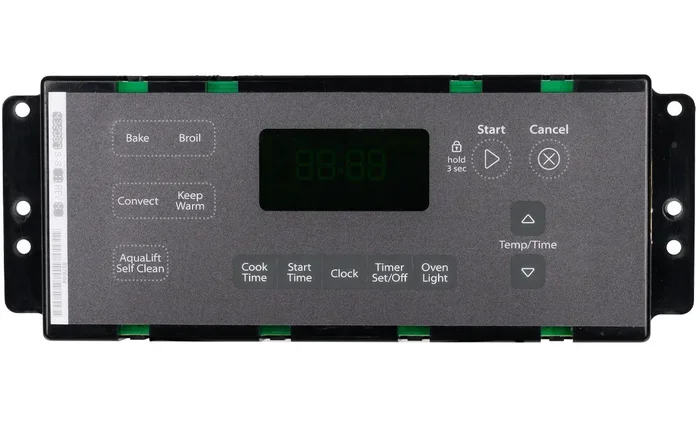
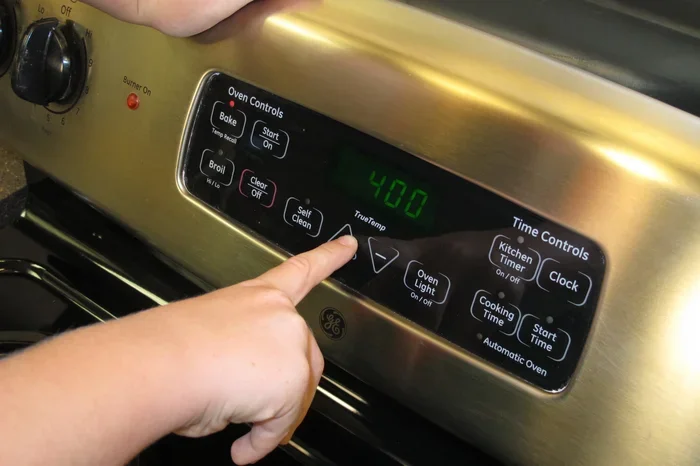
Most modern ovens use digital oven controls with buttons or a touchscreen. These ovens make it easy to set the exact cooking temperature you need. You press a button to choose the mode, another to set the temperature, and a third to start the oven warm-up.
Digital panels often include labels like “Bake,” “Convect,” “Roast,” and “Preheat.” The bake button is usually the main one you need for most recipes. Some ovens also have a dedicated “Preheat” button that does everything in one step.
Quick Tip: If you are not sure which button does what, check the manual or look for small icons above each button. A little oven icon usually means “Bake” or “Preheat.”
Touchscreen and Smart Ovens
High-end ovens now feature full touchscreen displays and even Wi-Fi connectivity. These smart ovens let you control settings from your phone. To preheat oven on a touchscreen model, you tap the screen, select your mode, enter the temperature, and tap “Start.”
Smart ovens often come with oven presets built in. These presets automatically set the right temperature settings for common tasks like baking cookies, roasting chicken, or warming bread. Using a preset is the fastest way to get your oven ready.
What Button to Press to Preheat Oven
Now that you understand your control panel, let us get to the main question. What button to press to preheat oven depends on your model, but the general steps are very similar across all types.
Step-by-Step for Button Ovens
Follow these steps to preheat oven on a standard digital model:
- Press the “Bake” or “Preheat” button. This tells the oven you want to heat it up for baking.
- Use the “+” or “-” buttons to set the oven temperature your recipe calls for.
- Press “Start” or “On.” The oven begins warming up immediately.
- Wait for the preheat indicator. Most ovens show a light or display message when they are ready.
That is it. Three or four simple button presses, and your oven is heating up. The entire oven preheating time usually takes between 10 and 15 minutes, depending on how hot you need it to go.
Step-by-Step for Dial Ovens
For ovens with a temperature dial, the process is even simpler:
- Turn the mode dial to “Bake.”
- Turn the temperature dial to the number your recipe requires.
- Wait for the oven to heat. Many dial ovens have a light that goes off when the oven ready signal is reached.
With a dial oven, you do not need to press any buttons at all. Just turn the dials and let the oven do its job.
Using the Convection Setting
If your oven has a convection oven feature, you can use it to speed up the oven warm-up process. The convection fan circulates hot air inside the oven, which means it reaches the target oven temperature faster than a standard oven.
To use convection for preheating, look for a button labeled “Convect,” “Fan,” or “Convection.” Press it along with the “Bake” or “Preheat” button. Then set your desired cooking temperature. Keep in mind that convection ovens often cook faster, so you may need to lower the temperature by about 25 degrees compared to a regular bake setting.
Quick Tip: Convection oven preheating time is typically 3 to 5 minutes shorter than standard preheating. This small change can save you real time on busy weeknights.
Understanding Preheat Indicators and Signals
One of the most helpful features on modern ovens is the preheat indicator. This signal tells you exactly when your oven has reached the right oven temperature and is ready for cooking.
Light Signals
Many ovens use a small light on the front panel to show preheating progress. When the light is on, the oven is still heating up. When the light turns off or changes color, your oven has reached the target oven temperature and the oven ready signal is active.
Some ovens use a blinking light instead. The light blinks during heating and becomes steady when preheating is complete. Check your oven’s manual to understand exactly what your model’s light patterns mean.
Audible Signals
Several ovens beep or chime when the preheat oven cycle is finished. This is especially helpful if you step away from the kitchen while waiting. If you hear a beep, check the display panel. It should show that the oven temperature has been reached.
Quick Tip: If your oven does not beep when preheating is done, set a timer on your phone or a kitchen timer. This ensures you do not forget and put food in too early or too late.
Display Screens
Ovens with digital displays show the current internal temperature in real time. You can watch the numbers climb until they match your target cooking temperature. Some displays even show a progress bar or a “Preheating” message until the process is complete.
These displays make it easy to track exactly how long preheating takes for your specific oven. Over time, you will learn your oven’s rhythm and how long it typically takes to reach common temperatures like 350°F or 400°F.
Common Mistakes When Preheating an Oven
Even though preheating seems simple, many people make mistakes that affect their cooking results. Here are the most common errors and how to avoid them.
Skipping Preheating Entirely
Some people put food in the oven before it reaches the right oven temperature. This leads to uneven cooking, longer bake times, and disappointing results. Your food needs that burst of heat to cook properly from the start.
Always wait for the oven ready signal before placing your dish inside. It might feel like you are waiting too long, but those extra minutes make a real difference in the final result.
Opening the Door Too Often
Every time you open the oven door during preheating, you let hot air escape. This resets the oven warm-up process and adds several minutes to the total wait time. Try to resist the urge to peek inside.
If you need to check on the progress, use the oven display or the light signal. You can also glance through the oven window without opening the door.
Setting the Wrong Temperature
It sounds obvious, but setting the wrong oven temperature is one of the most common mistakes. Always double-check your recipe before pressing any buttons. A simple mix-up between 350°F and 375°F can change your results significantly.
Quick Tip: Get into the habit of reading the recipe twice before you start preheating. This small step saves time, energy, and ingredients.
Ignoring the Oven Rack Position
Where you place the oven rack affects how evenly your food cooks. Most recipes call for the middle rack position. If you set the rack too low or too high, the cooking temperature may not distribute evenly, even if preheating was perfect.
Adjust the rack before you start the oven preheating time countdown. This way, everything is ready to go when the oven reaches the right temperature.
How Long Does Preheat Take?
The oven preheating time varies depending on several factors. Understanding these factors helps you plan your cooking better and avoid frustration.
Temperature Matters
The higher the oven temperature you set, the longer the preheating takes. Setting your oven to 350°F usually takes about 10 to 12 minutes. Going up to 400°F or 450°F can add 3 to 5 more minutes.
If you are in a hurry, consider whether your recipe truly needs a very high temperature. Some dishes taste just as good at 350°F and save you several minutes of waiting.
Oven Type and Age
Newer ovens generally heat up faster than older models. Convection ovens are the fastest because the fan pushes hot air around the cavity. Standard ovens without a fan take a bit longer to reach the target oven temperature.
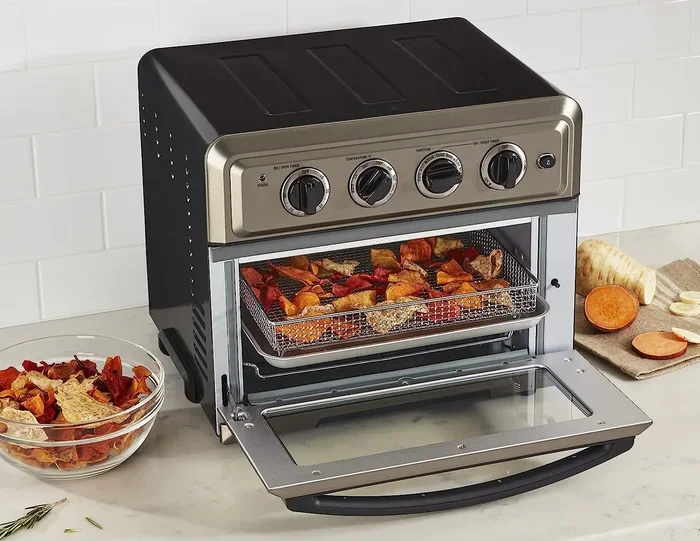
The size of your oven also matters. A compact or toaster oven preheats much faster than a full-size range oven. If you are cooking for one or two people, a small oven toaster can save significant preheating time.
How Full Your Oven Is
A crowded oven takes longer to preheat because the heat has to circulate around all the items inside. If you have pans, trays, or dishes inside during preheating, the oven warm-up process slows down.
Always preheat with an empty oven. Remove any items that are not part of the cooking process before you start the preheat oven cycle.
Expert Tips for Faster Preheating
Want to cut down your oven preheating time even more? These expert-approved tips help you get your oven ready faster without any extra equipment.
Keep the Oven Clean
A clean oven heats more efficiently. Grease and food residue inside the oven absorb heat and slow down the oven warm-up process. Wipe down the interior regularly to keep things running smoothly.
Quick Tip: After any spill, let the oven cool down and wipe it out. A quick 30-second cleaning session after each use keeps your oven in top shape.
Use the Right Rack Position
Place the rack in the middle position before preheating. This allows the best air circulation inside the oven cavity. Good airflow means faster and more even oven temperature distribution.
Avoid Using Foil on the Bottom
Some people line the bottom of the oven with aluminum foil to catch drips. While this sounds helpful, the foil actually reflects heat away and slows down the preheating process. Skip the foil during preheating for the best results.
Preheat Only When Necessary
Not every cooking task requires a fully preheated oven. Some recipes, like casseroles or slow-roasted vegetables, can go into a cold oven and still turn out great. Skipping preheat when it is not needed saves energy and time.
But for baking, pastries, and anything that needs a quick burst of heat, always preheat. The bake button and the wait are worth it for these recipes.
Oven Presets and Smart Features Worth Using
Modern ovens come loaded with helpful features that make preheat oven tasks simpler than ever. Learning to use these presets can transform your cooking experience.
Common Preset Buttons
Many ovens include dedicated buttons for popular cooking tasks. Here are the most common ones you will find:
- Bake: Standard top-and-bottom heat for most baking and roasting.
- Convection: Fan-assisted heat for faster, more even cooking.
- Pizza: Bottom heat focused on crisping the crust.
- Roast: High heat ideal for meats and vegetables.
- Broil: Top heat only for browning and melting.
- Defrost: Low ambient heat for thawing frozen items.
Each preset automatically adjusts the oven settings to match the task. You just select the preset, set the time or temperature, and press start. This is the easiest way to preheat oven without guessing.
Using the Oven Timer
The oven timer is one of the most underused features on any oven. You can set it independently of the cooking function to track how long your food has been in the oven. This helps you avoid overcooking and builds your confidence in the kitchen.
Some ovens allow you to set both the preheat oven cycle and the cooking timer at the same time. This means the oven starts heating while you prep your ingredients, so everything is ready when you are.
Troubleshooting Common Preheat Problems
Sometimes things go wrong with the preheating process. Here are the most common issues and how to fix them.
The Oven Does Not Heat Up
If you press the bake button and nothing happens, check a few things first. Make sure the oven is plugged in and the circuit breaker has not tripped. Also check if the door is fully closed, as many ovens will not start heating if the door is ajar.
If the oven is a dial model, make sure the knob is firmly pressed in and turned to the correct position. Sometimes the dial needs a firm push to engage the heating element.
The Preheat Light Stays On
If the preheat indicator stays on for a very long time, the oven may not be reaching the target oven temperature. This could mean the heating element is failing or the temperature sensor is malfunctioning. In this case, it is best to contact a professional repair service.
The Oven Beeps but Does Not Heat
Some ovens beep to confirm a button press but may not start the heating cycle if the door is not properly sealed. Check the door gasket for any gaps or damage. A worn-out gasket lets heat escape and prevents the oven ready signal from ever triggering.
Conclusion
Knowing exactly what button to press to preheat oven is one of the simplest yet most important kitchen skills you can learn. Whether your oven has a temperature dial, digital oven controls, or a full touchscreen, the process always comes down to a few straightforward steps. Choose your mode, set the oven temperature, and press start.
Use the preheat indicator or oven ready signal to know when your oven is at the right cooking temperature. Avoid common mistakes like skipping preheat or opening the door too often. And take advantage of oven presets and the convection setting to save time and energy.
With the tips and steps in this guide, you are fully equipped to preheat oven quickly and correctly every single time. The next time you step up to your oven, you will know exactly which button to press to preheat oven and how to get perfect results.
Frequently Asked Questions
Do I really need to preheat my oven before baking?
Yes, preheating is essential for most baking recipes. The initial burst of heat helps dough rise, creates a proper crust, and ensures even cooking. Skipping this step often leads to undercooked or uneven results.
How long does it take to preheat an oven to 350°F?
Most ovens take about 10 to 15 minutes to reach 350°F. Convection ovens may reach this temperature 3 to 5 minutes faster due to the fan that circulates hot air.
Can I put food in the oven while it is preheating?
It is best to wait until the preheat indicator shows the oven is ready. Putting food in too early means it starts cooking in a cold oven, which can affect texture and cooking time.
What is the difference between Bake and Convection on the oven panel?
The “Bake” setting uses top and bottom heating elements for standard cooking. The “Convection” setting adds a fan that circulates hot air, reducing oven preheating time and cooking food more evenly.
Why does my oven take so long to preheat?
Several factors can slow down oven warm-up, including a dirty oven, a crowded interior, a faulty heating element, or an older model. Keeping your oven clean and empty during preheating helps it heat faster.
Should I use oven presets for preheating?
Yes, oven presets are a great shortcut. They automatically set the right temperature settings and mode for common tasks. Just select the preset, press start, and wait for the oven ready signal before adding your food.